
🔥 Hot

Nu
Nu is the world’s largest digital financial services platform outside of Asia, serving over 105 million customers across Brazil, Mexico, and Colombia. The company is the fourth-largest financial institution in Latin America by number of customers.
Guided by our mission to fight complexity and empower people, we cater to customers’ complete financial journey, promoting financial access and advancement with responsible lending and transparency.
That's why our app was created to reflect everything we believe in: a transparent, simple, easy, and hassle-free experience, just as your financial life should be. No asterisks, tricks, or inexplicable fees.
We care about your financial peace of mind, that's why we offer human 24/7 support to help you via phone, email or your app’s chat.
🇧🇷Brazil:
Nu is the most recommended financial institution in Brazil, with over 92 million customers who love being able to manage their entire financial lives directly from their mobile phones.
Our solutions for Brazil include Credit Card, Loans, Investments, Insurance, PIX, Cashback, and way more.
- Nu Pagamentos S.A. – Instituição de Pagamento. CNPJ: 18.236.120/0001-58. R. Capote Valente, 39 - Pinheiros, São Paulo - SP, 05409-000
- Nu Financeira S.A. CNPJ: 30.680.829/0001-43
🇲🇽Mexico:
Nu Mexico, with more than 8 million customers, offers a seamless financial experience with its Credit Card and Cuenta Nu
Enjoy a credit card with no minimum purchase and a {{item.description}} annual fee, coupled with a savings account and debit card through Cuenta Nu. Effortlessly manage your finances with Dimo®, enabling transfers using your CLABE or phone number. Additionally, leverage Cajitas Nu to cultivate your savings and allocate funds for rent, vacations, or emergencies.
- Nu is regulated by Banco de México and the CNBV, Products in Mexico are offered by Nu México Financiera S.A. de C.V. S.F.P.
🇨🇴Colombia:
Nu has more than 1 million customers in Colombia whom have gain back the control of their time and money while saying goodbye to fine print, hidden charges and complexity with our Credit and Savings products.
Enjoy managing your finances from your cellphone with real-time notifications of your movements, blocking and unblocking your cards as many times you want from your app, having 24/7 support through chat, phone or email and secure transactions thanks to our technology.
___________________________________
Nu’s impact has been recognized in multiple awards, including Time 100 Companies, Fast Company’s Most Innovative Companies, and Forbes World’s Best Banks. Download the app and join the more than 105 million people who have said goodbye to bureaucracy, asterisks, paperwork, and fine print by joining the future of financial services.


Brainly: AI Homework Helper
Brainly, the AI Learning Companion
Brainly is a powerful Math solver app that can help you with your school doubts. Solve Math problems in Algebra, Trigonometry, & Geometry with correct & expert-verified answers instantly. With Brainly, you can find solutions to your math homework. Math answers have never been easier to find! Just use our math scanner, ask our community, or chat with a tutor for one-on-one help with step-by-step solutions for your math homework problems.
• 24/7 school homework app access - Unlimited access, anywhere, anytime with Brainly.
• Quick math problem solver - Math Questions are answered in minutes
• Expert-vetted answers - A team of subject experts moderators verify answers daily
• Ask by pic with math camera scanner feature
• Solve Math Problems by using Brainly Scan to Solve: learn math with step-by-step guidance on Algebra, Trigonometry, Geometry, & Calculus, including AP levels
• Find Math answers specific solutions created by our experts for your textbooks.
• Real-time help from pro math tutors with Brainly Tutor (Math, Physics, Chemistry, & Biology tutors)
Math Answer Scanner To Solve Math Problems
Do you ever wish you had a math helper? With Brainly, you'll get help instantly. Use our math scanner & word problem solver to find answers to complex problems. Brainly can work like a fraction calculator, a geometry solver, & an algebra practice tool. It’s like having a math helper in your pocket!
Deal with math concepts, & get instant math answers so you can say, “I’m done with my homework!” So, if you're stuck on a math problem, just use our math calculator as a problem solver.
Get Homework Help from a Community of Experts
With over 350M online study buddies ready to help, you won’t need a homework reminder to find the motivation to learn. Our community of helpful student experts can get your math homework answers in minutes.
It's like having millions of math word problem solvers all at once! All your questions deserve an answer! Our network of moderators ensures not only high-quality homework help but also makes sure that Brainly remains a safe place for learning & math practice.
With Brainly, you can turn learning into a fun challenge, show off your achievements & earn cool badges for answering the trickiest questions.
Get 1:1 Homework Help with Brainly Plus or Tutor
Sometimes, even a math calculator problem solver is not enough. If you're hungry for more quick math answers, you can upgrade to Brainly Tutor for Math, Physics, Chemistry, & Biology answers. With Brainly Tutor, you can instantly get connected to an expert to help you with your math problems.
With Brainly Plus, you can use our math solver without any limits or ads.
With Brainly, You are Learning Your Way! No matter what your math homework struggles are, we’re here to help you get unstuck in the easiest way possible.
Get fun updates from us on:
Instagram @Brainly or Facebook @BrainlyGroup & Twitter @Brainly
For any problems, reach out to our support team: http://brainly.com/contact | [email protected]
Marketing: http://brainly.com
Terms of use: https://brainly.com/pages/terms_of_use
Privacy policy: https://brainly.com/pages/privacy_policy

VN - Video Editor & Maker
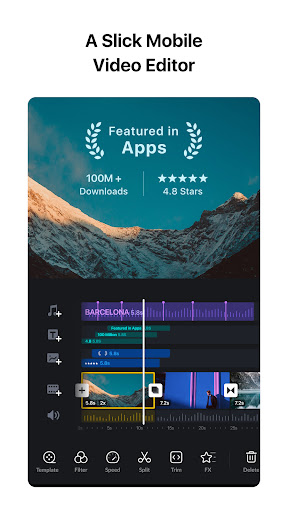
VN is an easy-to-use and free video editing app with no watermark. The intuitive interface makes video editing simple, with no prior knowledge needed. It offers all the features required to create professional and high-quality videos, satisfying both the needs of professional and amateur video editors.
Intuitive Multi-Track Video Editor
• Quick Rough Cut: The track edit design feature for PC versions is built in the VN app. This makes it easier for you to zoom in/out any materials and select keyframes as short as 0.05 seconds. You can make video editing as precise as you want.
• Delete & Reorder Easily: Swipe your finger up or down the screen to delete the selected video clips. Reorder your video materials simply by drag-and-drop.
• Multi-track Timeline: Easily add picture-in-picture videos, photos, stickers, and texts to your videos, and personalize them using the Keyframe animation feature.
• Save Drafts Anytime: Save a draft and undo/redo an action as many times as you want. The support for non-destructive editing allows you to make changes to an image without overwriting the original image data.
Easy-to-use Music Beats
• Music Beats: Add markers to edit video clips to the beat of the music and take your videos to the next level.
• Convenient Recording: Easily add high-quality voice-overs to make your videos more lively in minutes.
Trending Effects & Color Grading Filters
• Speed Curve: In addition to the regular speed change tool, Speed Curve helps to make your videos play out faster or slower. This feature is similar to Time Remapping in Adobe Premiere Pro. VN offers 6 preset curves for you to choose from.
• Transitions & Effects: Make your videos more lively by using the transitions and effects such as overlay and blur and setting their timing and speed.
• Rich Filters: Import LUT (.cube) files to make your videos more cinematic. Rich cinematic filters make it easy to create stunning visual effects.
Advanced Video Editor
• Keyframe Animation: Create awesome video effects using the 19 built-in keyframe animation effects to customize the products, you can also add other keyframes or curves to your footage to customize the results.
• Reverse & Zoom: Enjoy the novelty and fun to reverse your video clips, and use the zoom effects to make them more engaging.
• Freeze Frame: Create a time freeze effect simply by selecting and tapping a video frame to generate an image with 1.5 seconds duration.
• Creative Templates: Create music and video templates and share them with your friends and family.
Flexible Use of Materials
• Flexible Impor Method: Import music, sound effects, fonts, and stickers to VN via Wi-Fi, WhatsApp, or Telegram. You can also import files in bulk via Zip files. Using your materials for video editing is that simple.
• Material Library: Use the many stickers, fonts, and other materials available to add more fun to your videos.
Rich Text Templates
• Text Templates: Choose from the many text templates and fonts to match your video styles.
• Text Editing: Choose from various font styles and adjust the font color, size, spacing, and more in any way you like.
Create Effectively & Share Securely
• Seamless Collaboration: Transfer projects between mobile and desktop devices via Google Drive or OneDrive with ease. This allows for video editing anytime and anywhere.
• Protection Mode: Set expiration dates and passwords for your drafts and templates to secure your assets.
• Custom Export: Customize the video resolution, frame rate, and bit rate. 4K resolution, up to 60 FPS.
Discord: https://discord.gg/eGFB2BW4uM
YouTube: @vnvideoeditor
Email: [email protected]
Terms of Service: https://www.ui.com/legal/termsofservice
Privacy Policy: https://www.ui.com/legal/privacypolicy
Official Website: www.vlognow.me

Facebook
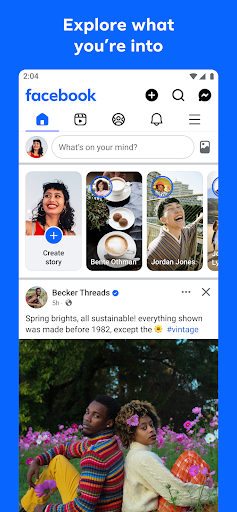
Where real people propel your curiosity. Whether you’re thrifting gear, showing reels to that group who gets it, or sharing laughs over fun images reimagined by AI, Facebook helps you make things happen like no other social network.
Explore and expand your interests:
* Shop Marketplace for hidden gems and take your hobbies to the next level
* Personalize your Feed to see more of what you like, less of what you don’t
* Ask Meta AI for information and get answers instantly
* Drive into reels that reflect the things you're interested in
* Search Facebook on any topic and get more interactive results
Connect with people and communities:
* Join groups to learn tips from real people who’ve been there, done that
* Get inspired by creators, or catch up with Friends
* Add new Friends to your world, but also decide how closely to keep up with them
* Privately message relatable posts that only your BFF will get or that reels trend everyone’s talking about
* Catch up with your friends through video and voice calls
Share your world:
* Use generative AI to create custom stickers and images to delight friends
* Customize your profile to choose how you show up and who sees your posts
* Effortlessly create reels from trending templates, or showcase your creativity with a full suite of editing tools
* Capture moments on the fly with stories
Some features may not be available in your country or region.
Terms & Policies: https://www.facebook.com/policies_center
Privacy Policy: https://www.facebook.com/privacy
Learn how we're working to help keep our communities safe across Meta technologies at the Meta Safety Center: https://about.meta.com/actions/safety


Instagram
Little moments lead to big friendships. Share yours on Instagram.
—From Meta
Connect with friends, find other fans, and see what people around you are up to and into. Explore your interests and post what's going on, from your daily moments to life's highlights.
Share what you’re up to and into on Insta®.
- Keep up with friends on the fly with Stories and Notes that disappear after 24 hours.
- Start group chats and share unfiltered moments with your Close Friends.
- Share memories from recent events or trips in Feed.
- Turn your life into a movie and discover short, entertaining videos on Instagram with Reels.
- Customize your posts with exclusive templates, music, stickers and filters.
Dive into your interests.
- Watch videos from your favorite Creators and discover new content that’s personalized to your interests.
- Get inspired by photos and videos from new accounts in Explore.
- Discover brands and small businesses, and shop products that are relevant to your personal style.
Some Instagram features may not be available in your country or region.
Terms and Policies - https://help.instagram.com/581066165581870
Consumer Health Privacy Policy: https://privacycenter.instagram.com/policies/health
Learn how we're working to help keep our communities safe across Meta technologies at the Instagram Safety Center: https://about.instagram.com/safety
✍️ Good reviews

Swift Alert
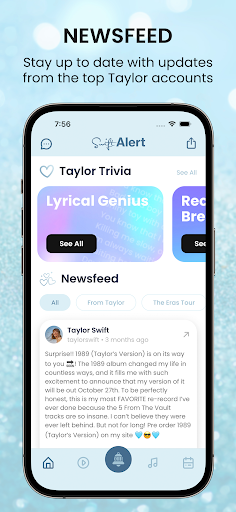
The ultimate app for Swifties! Swift Alert will keep you connected to the shows and the music with a newsfeed of key fan accounts, concert dates in your time zone, and real-time alerts so you can check out livestreams. The Surprise Song Tracker will ensure you always know the latest surprise songs, and trivia quizzes will give you a chance to test your knowledge and show off your Swiftie status to your friends.
Swift Alert is THE go-to source for Swifties!
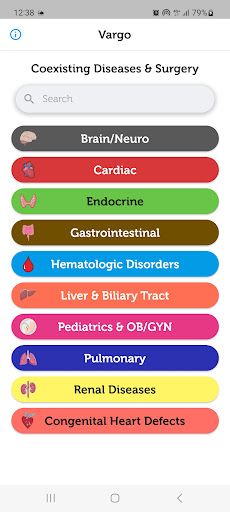

Coexisting Diseases & Surgery
A comprehensive medical disease app that contains the following:
1) Gives the description, etiology, onset, diagnosis, pathophysiology, treatment, and prognosis of common and rare diseases.
2) Provides specific information how to manage the surgical patient’s coexisting disease(s) perioperatively, and what the disease related concerns are.
One-time purchase with free updates.
This app is equivalent to a 4,000 page book and will always be expanded with frequent updates.
Categories:
Brain/Neuro
Cardiac
Hematologic Disorders
GI System
Endocrine System
Liver and Biliary Tract
Pediatrics
Renal Disease
Pulmonary
Congenital Heart Disease (coming soon)


Coscos
Coscos is a live social community with so many users around the world where you can connect with new friends, and watch talented creators
You can make real friends, chat with your favorite creators using our real-time chat, and join the new wave of social communication.


QuickBars for Home Assistant
Bring your smart home to the big screen. QuickBars for Home Assistant puts fast, beautiful controls on Android/Google TV so you can toggle lights, adjust climate, run scripts, and more—without leaving what you’re watching.
What it does
• Instant overlays (QuickBars): Launch an interactive sidebar over any app for tap-fast control of your favorite Home Assistant entities.
• Remote key actions: Map single, double, and long-press on your TV remote to open a QuickBar, toggle an entity, or launch another app.
• Camera PIP: Import your MJPEG streams and display them as PIP.
• Deep customization: Choose entities, icons, names, order, colors, and more to tailor the experience.
• TV-first UX: Built for Android/Google TV with smooth animations and a clean, couch-friendly layout.
• Launch a QuickBar or PIP from Home Assistant: Requires persistent background connection enabled, allows you to launch a camera PIP or a QuickBar based on an Home Assistant automation!
• Backup & Restore: Backup your Entities, QuickBars and Trigger keys manually and restore them, even to a different TV!
Private & secure
• Local connection: Connect directly to your Home Assistant using IP + a Long-Lived Access Token (optional remote access via HTTPS).
• Hardware-backed encryption: Your credentials are encrypted and stored locally; they never leave the device except to communicate with Home Assistant.
• Clear permission prompts for Accessibility (to capture remote button presses) and Display over other apps (to show overlays).
Easy setup
• Guided onboarding: Where to find your Home Assistant URL and how to create a token.
• QR Token Transfer: Scan a QR code and paste your token from your phone—no tedious typing on TV.
Entity management
• Import the entities you care about, rename them with friendly names, choose icons, customize single/long-press actions, and reorder freely.
• Automatically flags orphaned entities that were removed from Home Assistant.
Free vs Plus
• Free: 1 QuickBar & 1 Trigger Key. Full styling options. Full single/double/long-press support.
• Plus (one-time purchase): Unlimited QuickBars & Trigger Keys, plus advanced layouts:
• Position QuickBars at Top / Bottom / Left / Right of the screen
• For left/right positions, choose 1-column or 2-column grid
Requirements
• A running Home Assistant instance (local or reachable via HTTPS).
• Android/Google TV device.
• Permissions: Accessibility (for remote key capture) and Display over other apps.
Take control of your home from the couch. Download QuickBars for Home Assistant and make your TV the smartest remote you own.
QuickBars for Home Assistant is an independent project and is not affiliated with Home Assistant or the Open Home Foundation.


Apteka.ru — заказ лекарств
Apteka.ru – это интернет-аптека для поиска и заказа лекарств, косметики, витаминов и БАДов по приемлемой стоимости. Выбирайте из более чем 35 000 наименований и заказывайте в аптеку рядом с домом.
Препараты имеют необходимые сертификаты, их можно заказать по акции или со скидкой по промокоду. Покупка заказов в 35 000 аптек в 95 городах России, таких как: Санкт-Петербург, Владимир, Вологда, Ижевск, Йошкар-Ола, Калуга, Новгород, Новосибирск, Рязань, Смоленск, Тверь, Ярославль, Иваново, Липецк. Доставка – от 1 дня.
Возможности приложения Apteka.ru:
• удобный поиск лекарств онлайн (в том числе голосовой) по названию препарата, действующего вещества, заболеванию, симптому, сортировка и фильтры по стоимости;
• структурированный каталог, разбитый по категориям;
• возможность сравнить цены на все доступные варианты препарата (по форме выпуска, дозировке, объёму);
• исчерпывающая информация о каждом препарате (производитель, состав, инструкция, период и условия хранения);
• подборка возможных аналогов лекарства и цены на них;
• упрощённое оформление заказа (быстрее, чем на сайте).
Преимущества сервиса:
• работает быстро и стабильно;
• бесплатное приложение без внешней рекламы;
• конкурентные цены;
• сотни акций и скидки каждый день;
• полная информация о лекарствах, их аналогах и ценах;
• круглосуточная телефонная "горячая линия" 8 800 700 88 88.
Аптечные сети, которые с нами работают:
Озерки, ЗдравСити, ГОРЗДРАВ, 36.6, Ригла, Планета Здоровья, Доктор Столетов, Вита, Апрель, Невис, Максавит, Еаптека, Аптечество, Самсон-Фарма, ЛекОптТорг, Радуга, Диалог, Мосаптека, Юнифарма, Росаптека, WER.RU, Будь здоров!, Номер 1, Farmani, Хорошая, Живика, ПроАптека, Омнифарм, Мегафарм Плюс, Надежда Фарм, Фармация, Superapteka, Первая помощь, Народная аптека, Все для здоровья, ЗдесьАптека, Еврофарм, Алоэ, Аптеки 36.7, 120/80, Ваша №1, ЛенОблФарм, Мелодия здоровья, Гармония здоровья, Эдельвейс, Социальная аптека, Губернские аптеки, Новая аптека, Фармакопейка, Антей, Здоровье, Ставропольские городские аптеки, Фармаимпекс, ЮГФарма, Фармленд, Леко, Витаминка, Дешевая аптека.
Подробнее о приложении Apteka.ru
Не гуглите "найти лекарство в аптеке у дома", смотрите цены и аналоги лекарств в приложении apteka.ru.
У нас прямые контракты с производителями, и поэтому выгодные цены и качественные товары.
Удобный справочник лекарств и подробное описание каждой таблетки помогут принять оптимальное решение. Просто оформите заказ и его доставят в выбранную аптеку в течение 1-3 дней. Вам останется только купить заказанные товары.
Ассортимент сервиса: лекарства и БАД, популярные товары для детей, беременных и кормящих мам, аптечная и профессиональная косметика, медицинские приборы, спортивное и лечебное питание.
🔥 Hot Comments


JMO (Jamsostek Mobile)
Inovasi terbaru layanan digital dari BPJS Ketenagakerjaan
JMO memudahkanmu dalam memenuhi kebutuhan layanan digital BPJAMSOSTEK tanpa harus ke kantor cabang, kena macet, panas, hujan dan antrian yang bikin meriang.
Hadir dengan berbagai fitur :
1. Pengkinian Data
2. Pengajuan & Lacak Klaim JHT
3. Kemudahan Daftar & Pembayaran Iuran Segmen BPU
4. Simulasi Saldo JHT dan JP
5. Cek Saldo
6. Kartu digital
7. Lokasi Kanal Pelayanan
8. Promo
9. Berita
10. Pengaduan
11. Laporan
12. Informasi Manfaat
Unduh JMO sekarang!
Berubah untuk lebih mudah!
Informasi lebih lanjut silahkan menghubungi pusat layanan BPJS Ketenagakerjaan :
Call center : 175
Twitter : @bpjstkinfo
Facebook : BPJS Ketenagakerjaan
Website : http://www.bpjsketenagakerjaan.go.id
Email : [email protected]


OSM 25/26 Soccer Manager Game
Manage your favorite football team in this brand new season of Online Soccer Manager, the ultimate free-to-play football game featuring real leagues, clubs, and players worldwide.
Kickstart your football manager career by signing with your favorite club, whether it's in Serie A, Premier League, Primera Division, or any global league. Take charge of renowned clubs like Real Madrid, FC Barcelona, or Liverpool FC.
From that point on, you're the coach! Control your team's formation, line-up, and tactics. Be in command of player transfers, scouting, training, and stadium expansion to ensure your soccer team excels and meets club objectives.
Play alongside friends in the same league, reveling in the thrill of friendly competition in this engaging soccer game.
Key Features:
- OSM boasts real football leagues, clubs, and players worldwide for an authentic soccer gaming experience. Play with clubs like FC Barcelona, AC Milan or Liverpool FC in this mobile manager game.
- Design your ideal formation and line-up.
- Utilize a diverse set of tactics for your team.
- Manage player transfers with the sophisticated transfer list.
- Scout talents or proven superstars to enhance your team.
- Train and improve your players' skills.
- Engage in unlimited friendly matches to refine tactics and boost player performance.
- Expand your stadium for increased revenue and better facilities.
- Experience exciting match simulations with the Match Experience feature.
- Showcase your soccer manager skills globally by completing the World Map.
- Compete with friends in the same league and establish dominance.
- Play thrilling football games against managers worldwide, aiming to become a superstar. Join over 50 million players globally!
- OSM is available in 30 different languages.
Note: This game includes optional in-game purchases (includes random items). Refer to our Terms of Service and Privacy Policy for details.
Nu
Nu is the world’s largest digital financial services platform outside of Asia, serving over 105 million customers across Brazil, Mexico, and Colombia. The company is the fourth-largest financial institution in Latin America by number of customers.
Guided by our mission to fight complexity and empower people, we cater to customers’ complete financial journey, promoting financial access and advancement with responsible lending and transparency.
That's why our app was created to reflect everything we believe in: a transparent, simple, easy, and hassle-free experience, just as your financial life should be. No asterisks, tricks, or inexplicable fees.
We care about your financial peace of mind, that's why we offer human 24/7 support to help you via phone, email or your app’s chat.
🇧🇷Brazil:
Nu is the most recommended financial institution in Brazil, with over 92 million customers who love being able to manage their entire financial lives directly from their mobile phones.
Our solutions for Brazil include Credit Card, Loans, Investments, Insurance, PIX, Cashback, and way more.
- Nu Pagamentos S.A. – Instituição de Pagamento. CNPJ: 18.236.120/0001-58. R. Capote Valente, 39 - Pinheiros, São Paulo - SP, 05409-000
- Nu Financeira S.A. CNPJ: 30.680.829/0001-43
🇲🇽Mexico:
Nu Mexico, with more than 8 million customers, offers a seamless financial experience with its Credit Card and Cuenta Nu
Enjoy a credit card with no minimum purchase and a {{item.description}} annual fee, coupled with a savings account and debit card through Cuenta Nu. Effortlessly manage your finances with Dimo®, enabling transfers using your CLABE or phone number. Additionally, leverage Cajitas Nu to cultivate your savings and allocate funds for rent, vacations, or emergencies.
- Nu is regulated by Banco de México and the CNBV, Products in Mexico are offered by Nu México Financiera S.A. de C.V. S.F.P.
🇨🇴Colombia:
Nu has more than 1 million customers in Colombia whom have gain back the control of their time and money while saying goodbye to fine print, hidden charges and complexity with our Credit and Savings products.
Enjoy managing your finances from your cellphone with real-time notifications of your movements, blocking and unblocking your cards as many times you want from your app, having 24/7 support through chat, phone or email and secure transactions thanks to our technology.
___________________________________
Nu’s impact has been recognized in multiple awards, including Time 100 Companies, Fast Company’s Most Innovative Companies, and Forbes World’s Best Banks. Download the app and join the more than 105 million people who have said goodbye to bureaucracy, asterisks, paperwork, and fine print by joining the future of financial services.
Brainly: AI Homework Helper
Brainly, the AI Learning Companion
Brainly is a powerful Math solver app that can help you with your school doubts. Solve Math problems in Algebra, Trigonometry, & Geometry with correct & expert-verified answers instantly. With Brainly, you can find solutions to your math homework. Math answers have never been easier to find! Just use our math scanner, ask our community, or chat with a tutor for one-on-one help with step-by-step solutions for your math homework problems.
• 24/7 school homework app access - Unlimited access, anywhere, anytime with Brainly.
• Quick math problem solver - Math Questions are answered in minutes
• Expert-vetted answers - A team of subject experts moderators verify answers daily
• Ask by pic with math camera scanner feature
• Solve Math Problems by using Brainly Scan to Solve: learn math with step-by-step guidance on Algebra, Trigonometry, Geometry, & Calculus, including AP levels
• Find Math answers specific solutions created by our experts for your textbooks.
• Real-time help from pro math tutors with Brainly Tutor (Math, Physics, Chemistry, & Biology tutors)
Math Answer Scanner To Solve Math Problems
Do you ever wish you had a math helper? With Brainly, you'll get help instantly. Use our math scanner & word problem solver to find answers to complex problems. Brainly can work like a fraction calculator, a geometry solver, & an algebra practice tool. It’s like having a math helper in your pocket!
Deal with math concepts, & get instant math answers so you can say, “I’m done with my homework!” So, if you're stuck on a math problem, just use our math calculator as a problem solver.
Get Homework Help from a Community of Experts
With over 350M online study buddies ready to help, you won’t need a homework reminder to find the motivation to learn. Our community of helpful student experts can get your math homework answers in minutes.
It's like having millions of math word problem solvers all at once! All your questions deserve an answer! Our network of moderators ensures not only high-quality homework help but also makes sure that Brainly remains a safe place for learning & math practice.
With Brainly, you can turn learning into a fun challenge, show off your achievements & earn cool badges for answering the trickiest questions.
Get 1:1 Homework Help with Brainly Plus or Tutor
Sometimes, even a math calculator problem solver is not enough. If you're hungry for more quick math answers, you can upgrade to Brainly Tutor for Math, Physics, Chemistry, & Biology answers. With Brainly Tutor, you can instantly get connected to an expert to help you with your math problems.
With Brainly Plus, you can use our math solver without any limits or ads.
With Brainly, You are Learning Your Way! No matter what your math homework struggles are, we’re here to help you get unstuck in the easiest way possible.
Get fun updates from us on:
Instagram @Brainly or Facebook @BrainlyGroup & Twitter @Brainly
For any problems, reach out to our support team: http://brainly.com/contact | [email protected]
Marketing: http://brainly.com
Terms of use: https://brainly.com/pages/terms_of_use
Privacy policy: https://brainly.com/pages/privacy_policy
VN - Video Editor & Maker
VN is an easy-to-use and free video editing app with no watermark. The intuitive interface makes video editing simple, with no prior knowledge needed. It offers all the features required to create professional and high-quality videos, satisfying both the needs of professional and amateur video editors.
Intuitive Multi-Track Video Editor
• Quick Rough Cut: The track edit design feature for PC versions is built in the VN app. This makes it easier for you to zoom in/out any materials and select keyframes as short as 0.05 seconds. You can make video editing as precise as you want.
• Delete & Reorder Easily: Swipe your finger up or down the screen to delete the selected video clips. Reorder your video materials simply by drag-and-drop.
• Multi-track Timeline: Easily add picture-in-picture videos, photos, stickers, and texts to your videos, and personalize them using the Keyframe animation feature.
• Save Drafts Anytime: Save a draft and undo/redo an action as many times as you want. The support for non-destructive editing allows you to make changes to an image without overwriting the original image data.
Easy-to-use Music Beats
• Music Beats: Add markers to edit video clips to the beat of the music and take your videos to the next level.
• Convenient Recording: Easily add high-quality voice-overs to make your videos more lively in minutes.
Trending Effects & Color Grading Filters
• Speed Curve: In addition to the regular speed change tool, Speed Curve helps to make your videos play out faster or slower. This feature is similar to Time Remapping in Adobe Premiere Pro. VN offers 6 preset curves for you to choose from.
• Transitions & Effects: Make your videos more lively by using the transitions and effects such as overlay and blur and setting their timing and speed.
• Rich Filters: Import LUT (.cube) files to make your videos more cinematic. Rich cinematic filters make it easy to create stunning visual effects.
Advanced Video Editor
• Keyframe Animation: Create awesome video effects using the 19 built-in keyframe animation effects to customize the products, you can also add other keyframes or curves to your footage to customize the results.
• Reverse & Zoom: Enjoy the novelty and fun to reverse your video clips, and use the zoom effects to make them more engaging.
• Freeze Frame: Create a time freeze effect simply by selecting and tapping a video frame to generate an image with 1.5 seconds duration.
• Creative Templates: Create music and video templates and share them with your friends and family.
Flexible Use of Materials
• Flexible Impor Method: Import music, sound effects, fonts, and stickers to VN via Wi-Fi, WhatsApp, or Telegram. You can also import files in bulk via Zip files. Using your materials for video editing is that simple.
• Material Library: Use the many stickers, fonts, and other materials available to add more fun to your videos.
Rich Text Templates
• Text Templates: Choose from the many text templates and fonts to match your video styles.
• Text Editing: Choose from various font styles and adjust the font color, size, spacing, and more in any way you like.
Create Effectively & Share Securely
• Seamless Collaboration: Transfer projects between mobile and desktop devices via Google Drive or OneDrive with ease. This allows for video editing anytime and anywhere.
• Protection Mode: Set expiration dates and passwords for your drafts and templates to secure your assets.
• Custom Export: Customize the video resolution, frame rate, and bit rate. 4K resolution, up to 60 FPS.
Discord: https://discord.gg/eGFB2BW4uM
YouTube: @vnvideoeditor
Email: [email protected]
Terms of Service: https://www.ui.com/legal/termsofservice
Privacy Policy: https://www.ui.com/legal/privacypolicy
Official Website: www.vlognow.me

